Official app · in.billbase.app

BillBase for Android

The official BillBase app for Android phones. Sign in to your BillBase account to raise GST invoices, record payments, look up customers and stock, and share documents — from the counter or on the move.

Available

  • Google Play Listed as in.billbase.app. Play installs and updates it for you.
  • Direct download (APK) Not available yet. It will be published on this page with its version, size and SHA-256 checksum once the release is verified.
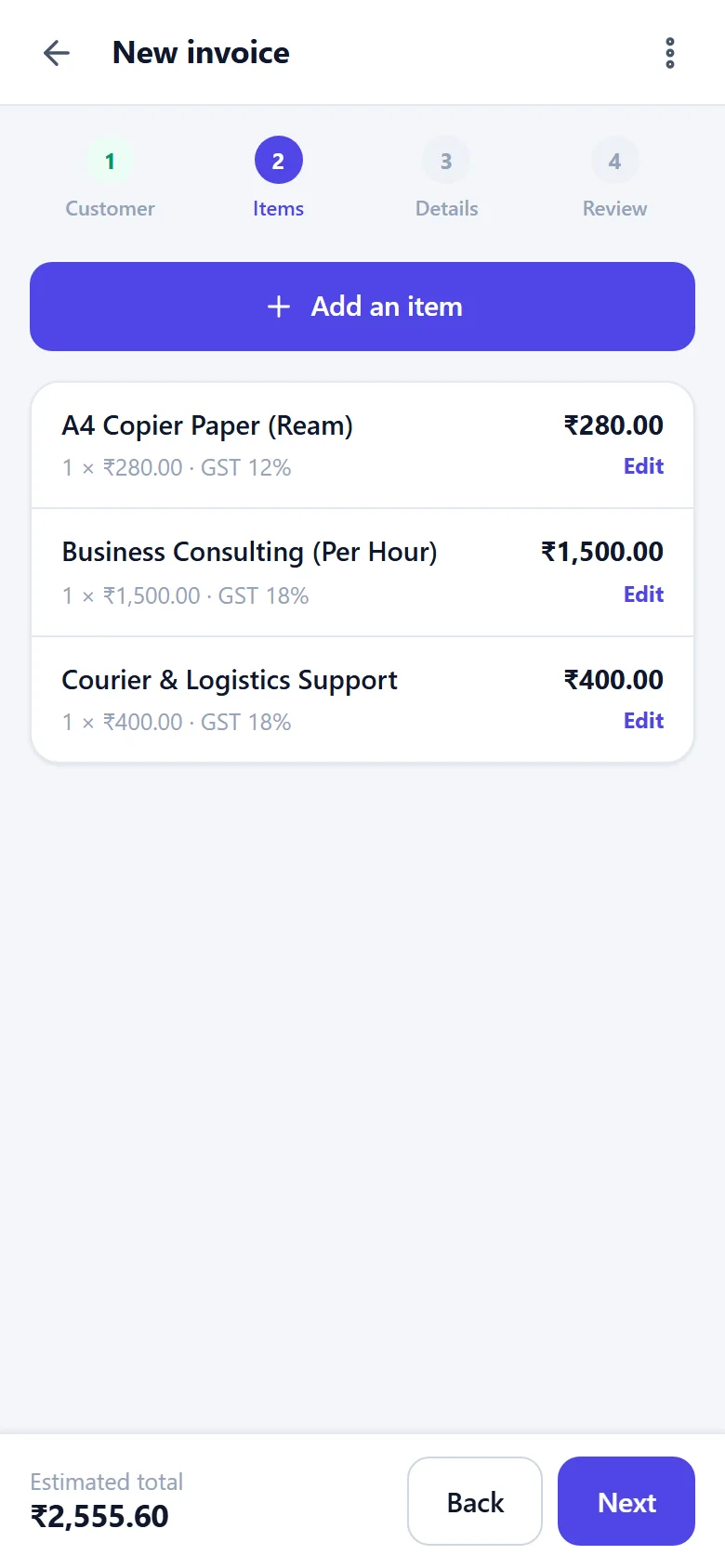
Creating an invoice in the BillBase Android app: three items with their GST rates and the estimated total (demo data)
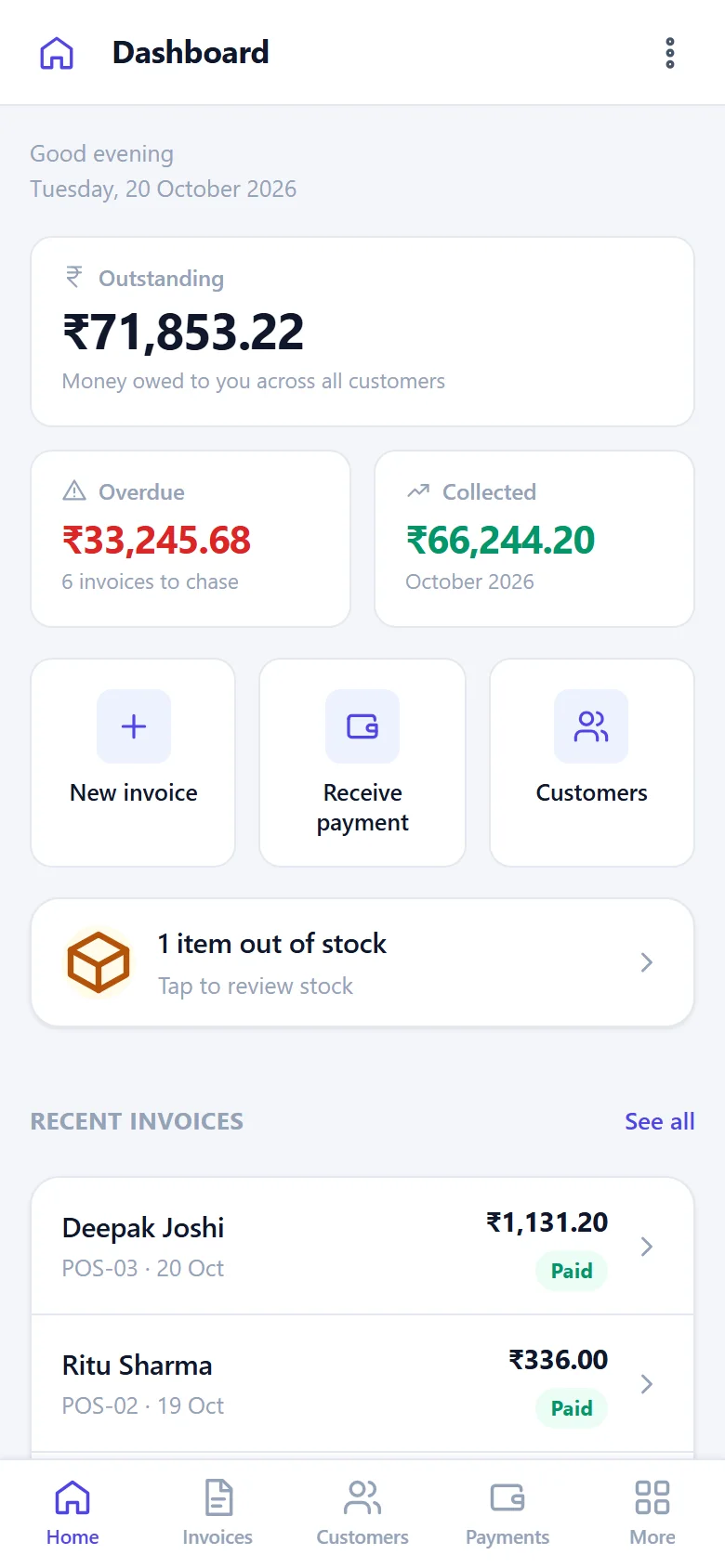
The BillBase Android app's dashboard: outstanding, overdue and collected, quick actions and recent invoices (demo data)
App details

What you are installing

Read from the release build itself. If anything you are offered elsewhere does not match these details, it is not the official BillBase app.

App name
BillBase
Package name
in.billbase.app
Version
1.0.1 (version code 2)
Download size
Published with the download
Requires
Android 7.0 or later (API level 24)
Built for
Android 16 (target API level 36)
Permissions
Internet, Network state, Camera — the camera only to scan barcodes, and Android asks you first
Price
Free to install — you sign in with your BillBase account
Publisher
BillBase, by Digital Hokage Private Limited
In the app

Your BillBase account, built for a thumb.

The app opens the same account as billbase.in — the same customers, invoices and stock, nothing to sync — with screens designed for a phone. What you can use follows your plan.

The BillBase dashboard on a phone: outstanding, overdue and collected, quick actions and recent invoices (demo data)
Dashboard
Creating an invoice on a phone: three items added, each with its GST rate, and the estimated total (demo data)
New invoice
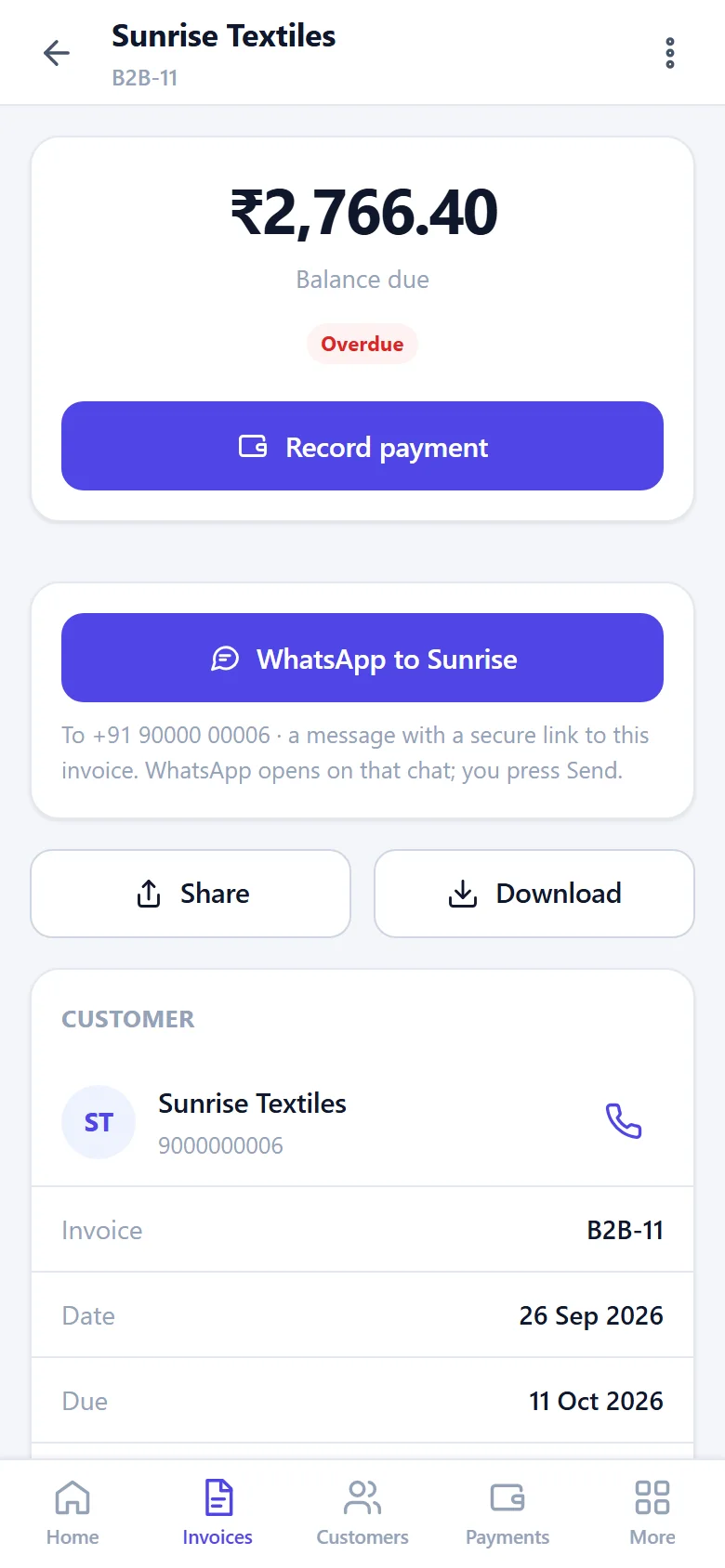
An invoice on a phone: the balance due, Record payment, WhatsApp to the customer and Share (demo data)
Share an invoice
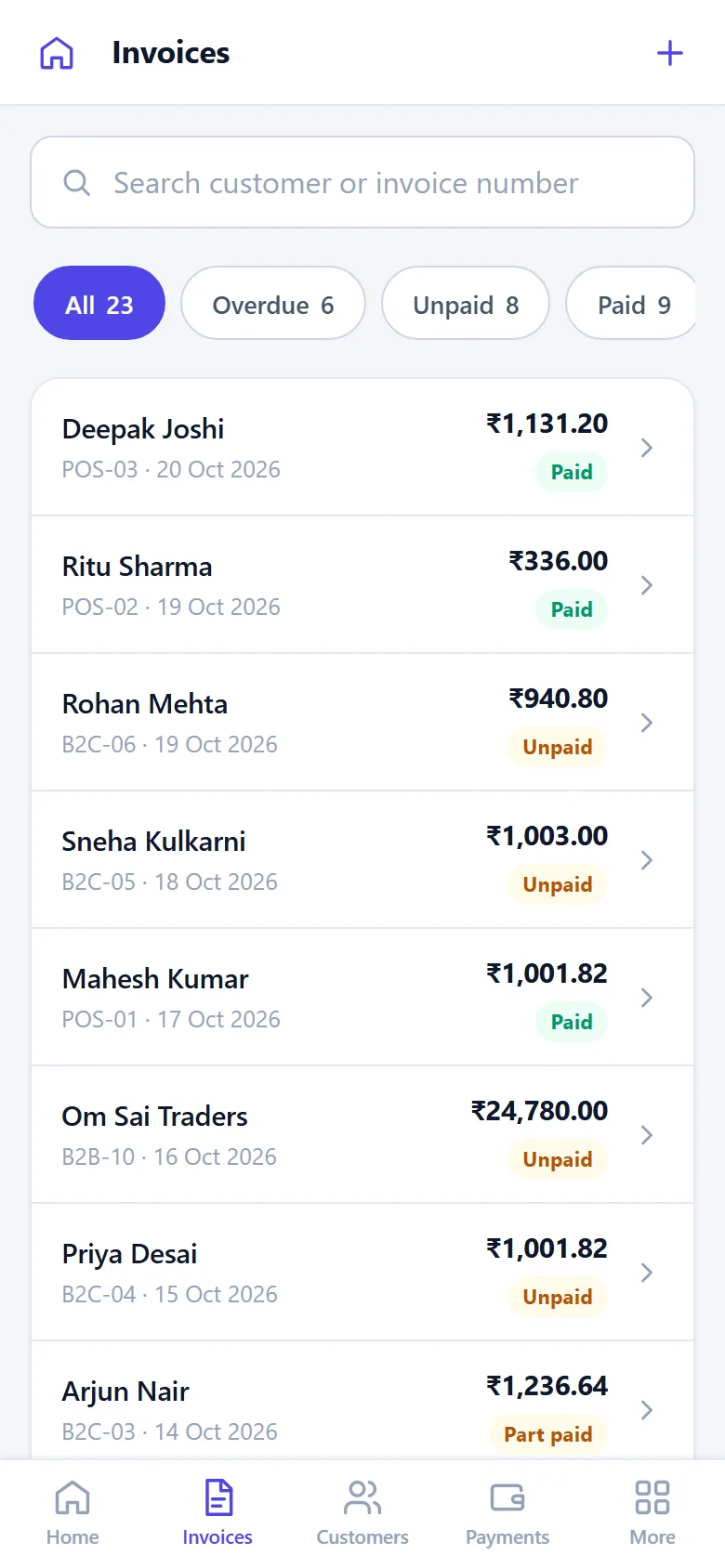
The invoice list on a phone: each invoice with its customer, number, amount and status (demo data)
Invoices
Raise GST invoicesPick the customer and the items; numbering and the GST split are worked out for you.
Record paymentsAgainst the invoice they settle, by cash, UPI, bank transfer, cheque or card.
Share documentsAn invoice as an image or PDF to WhatsApp or any app, through the phone’s share sheet.
Scan barcodesFind an item with the phone’s camera, where your plan includes barcodes.
Stays signed inClose the app and come back where you were, on a device you trust.
How to install

Two official ways to install it

Use whichever is available above. Both give you the same app, signed with the same certificate, so either one can update the other.

From Google Play

Available
  1. Open the Google Play link on this page, or search Google Play for “BillBase”.
  2. Check the listing is for the app BillBase — the link on this page always is.
  3. Tap Install, open BillBase, and sign in with your BillBase email and password.

Google Play keeps the app up to date for you.

Direct download (APK)

Not available yet
  1. On your phone, open billbase.in/download-android.php in Chrome and tap Download APK.
  2. Open the downloaded file. If Android says your phone is not allowed to install unknown apps from this source, tap Settings and allow it for Chrome only.
  3. Tap Install, then open BillBase and sign in.
  4. Turn Install unknown apps back off for Chrome: Settings › Apps › Special app access › Install unknown apps.

Before installing, you can check the file’s SHA-256 against the one on this page — see below.

Security & authenticity

Make sure it is the real BillBase

Your invoices and customers are business records. Install BillBase only from an official source, and check what you install.

  • Two official sources only The Google Play listing for in.billbase.app, and this page on billbase.in. BillBase is not distributed through WhatsApp forwards, Telegram groups or third-party APK sites — do not install a copy from them.
  • Check the package name The official app is in.billbase.app. You can see it under Settings › Apps › BillBase › App details.
  • Check the SHA-256 of a downloaded APK On a computer, run certutil -hashfile BillBase-1.0.1-2.apk SHA256 (Windows) or shasum -a 256 BillBase-1.0.1-2.apk (macOS, Linux) and compare it with the value this page shows with the download. Any difference means the file is not ours.
  • One signing certificate Every official build is signed with the certificate Google Play uses for BillBase. Android will not let an app signed by anyone else update the one you installed.
  • Few permissions Internet and network state, to reach your account, and the camera, to scan barcodes. No contacts, SMS, call logs or location.
  • Keep Google Play Protect on It checks apps on your phone, including ones installed from outside Google Play.
Updates

Staying up to date

Installed from Google Play, BillBase updates like any other app. Installed from this page, come back here: a newer version installs over the old one. Your data lives in your BillBase account, not on the phone, so updating or reinstalling never loses an invoice. The current version is 1.0.1 (version code 2).

Troubleshooting

If something gets in the way

“For your security, your phone is not allowed to install unknown apps from this source”
That is Android protecting you. Tap Settings on the message and allow Install unknown apps for Chrome (or the app you downloaded with), install BillBase, then switch it back off under Settings › Apps › Special app access.
“App not installed” or “package conflicts with an existing package”
A copy of BillBase signed with a different certificate — for example a test build — is already on the phone. Uninstall it, then install the official app. Your data is in your BillBase account, so nothing is lost.
“There was a problem parsing the package”
The download did not finish, or the phone runs a version of Android older than 7.0. Download the file again on a steady connection, and check your version under Settings › About phone.
Google Play Protect shows a warning
Do not install a file you cannot verify. Check that it came from this page on billbase.in and that its SHA-256 matches the one shown here. If it does not match, delete it and tell us.
The app opens but says I am offline
BillBase needs an internet connection to show your figures — it says so rather than show balances that may be out of date. Reconnect and pull down to refresh.
I cannot sign in
Use the same email and password as on billbase.in. If you have forgotten the password, use Forgot password on the sign-in screen. No account yet? Create one, or try the live demo first.
I use an iPhone
This page is for the Android app. On an iPhone, use BillBase in Safari at billbase.in.

Need a hand with the app?

Message us with what you see on the screen — a screenshot helps — and a person who works on BillBase answers.

See BillBase working first.

The live demo is a private copy of a sample business, ready for an hour — on your phone or your computer.